Most people use Claude the same way they use a search bar. Open a chat, ask a question, get an answer, close the tab. That works fine for one off questions. It breaks down the moment you have a topic you keep coming back to.
I noticed this with my own blog work. Every time I opened a new chat to write in my style guide, I was pasting the same instructions again. Simple Indian English, calm tone, no em dashes, Observation to Explanation to Example to Takeaway. That is a lot of repeated typing for something Claude should just remember. Project Knowledge is the feature that fixes this.
What Project Knowledge actually is
A Project in Claude is a workspace. Inside that workspace, you can upload documents, text, or files into something called the knowledge base. Anything sitting in that knowledge base is available to every chat you start inside that project, without you uploading it again.
Think of it as the difference between briefing a new freelancer every single time versus working with someone who already has your style guide on their desk. The knowledge base is that desk.
You can add PDFs, Word files, plain text, code, or just paste content directly. On paid plans, Claude uses Retrieval Augmented Generation behind the scenes, so it can handle a lot more content than what fits in one chat window. You do not need to think about token limits the way you would in a regular conversation.
Where I actually use this
I run a few different projects. One is purely for blog writing on my Ghost site, with my style guide and a few sample posts sitting in the knowledge base. Another is for evaluating tools and purchases, where I keep my research notes and comparison criteria so I am not starting from zero every time I look at a new SSD or subscription.
The real value shows up in the second or third session, not the first. In session one, uploading a style guide feels like extra work. By session five, when Claude is already writing in your voice without you explaining it again, you understand why the setup was worth it.
Project Knowledge versus Custom Instructions
These two get mixed up, so it is worth separating them.
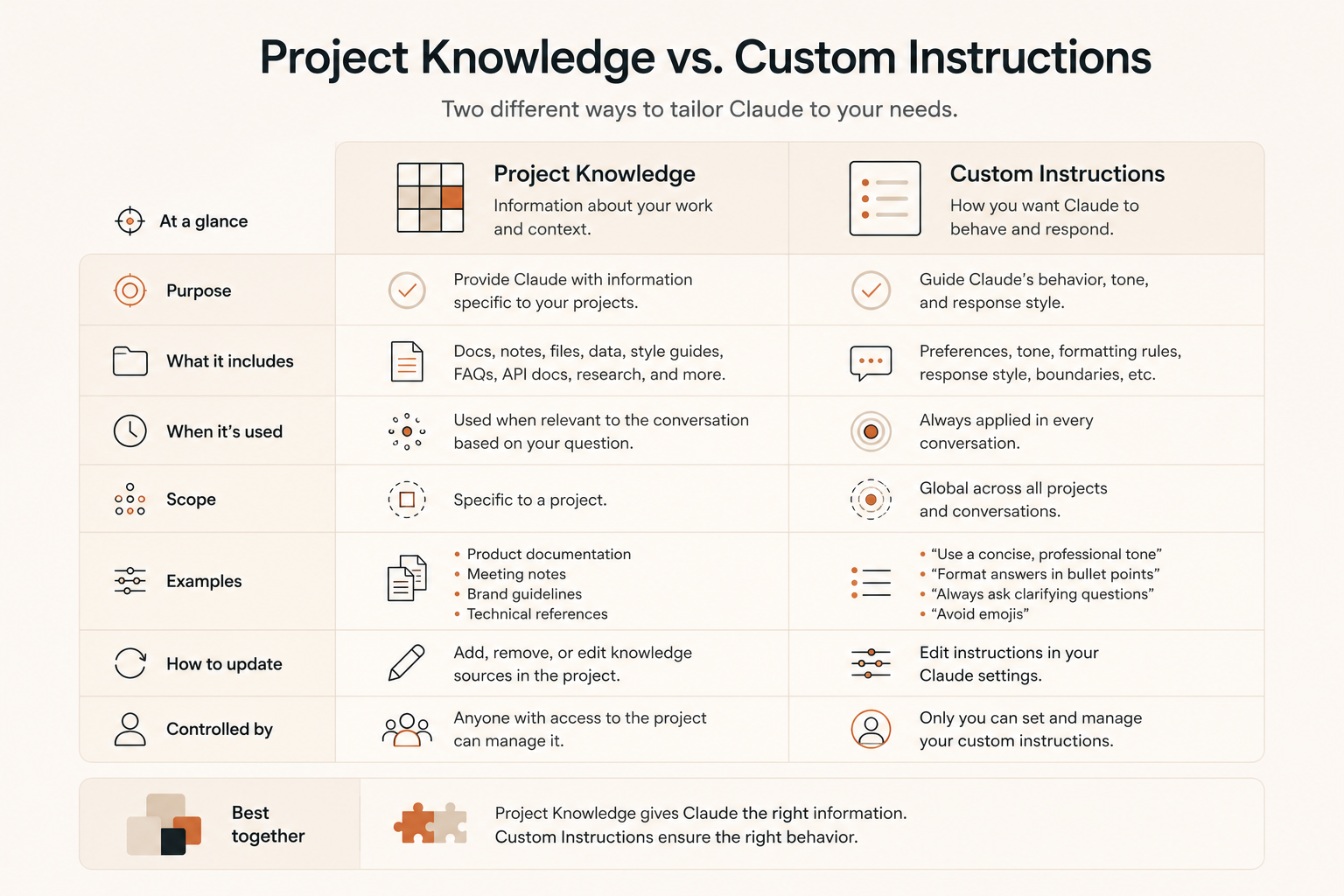
Custom instructions are the pre-prompt. They tell Claude who you are, what role to take, and how to behave in this project. Knowledge base files are the reference material Claude pulls from when answering. One shapes behaviour, the other supplies facts and context.
A useful way to decide: if it is guidance on how to respond, it goes in instructions. If it is something Claude needs to look up or quote from, it goes in the knowledge base.
A few practical lessons
Keep the knowledge base tight. A folder full of loosely related files dilutes retrieval quality. I learned this the hard way after dumping too many old drafts into one project and noticing Claude's references getting less precise.
Name files properly. "Style Guide v3" is far more useful to Claude than "notes." Vague file names lead to vague retrieval.
Review and prune monthly. Old versions of documents sitting next to new ones create quiet contradictions. Claude cannot tell which one you actually want followed unless you remove the outdated one yourself.
Separate projects by purpose, not by everything you do. One giant project called "Work" defeats the point. The value comes from focus, not from having a single place for all your Claude usage.
The takeaway
Project Knowledge is not a fancy feature you switch on once and forget. It is closer to setting up a proper filing system before you start a big task. The setup cost is real, but it is paid once. Every chat after that starts from a stronger baseline instead of zero.
If you find yourself repeating the same context in every new Claude chat, that repetition itself is the signal. It means the information belongs in a project's knowledge base, not in your typing fingers.